Magent Architecture
Magent is an Emacs-native AI coding agent. Its core design choice is that a serious Emacs workflow already has rich live state: buffers, modes, projects, Magit, Org, xref, LSP, process buffers, and years of user-specific interaction habits. Magent therefore runs as an Emacs Lisp agent runtime instead of wrapping a terminal-only coding agent.
The boundary is intentionally narrow:
- Provider transport, HTTP/SSE handling, model selection, and API keys stay in
gptelthroughgptel-request. - Conversational interaction is supported only through
agent-shelland its in-process ACP adapter. Explicit registered Actions may also expose trustedM-xcommand wrappers without creating another conversation frontend. - Agent execution, Action invocation, tool orchestration, permission decisions, sessions, skills, capabilities, and child-agent jobs are owned by Magent.
- Codex-style seatbelt, bubblewrap, sandbox, and shell isolation are out of scope. Magent permissions are workflow controls and audit records, not an OS security boundary.
System Boundary
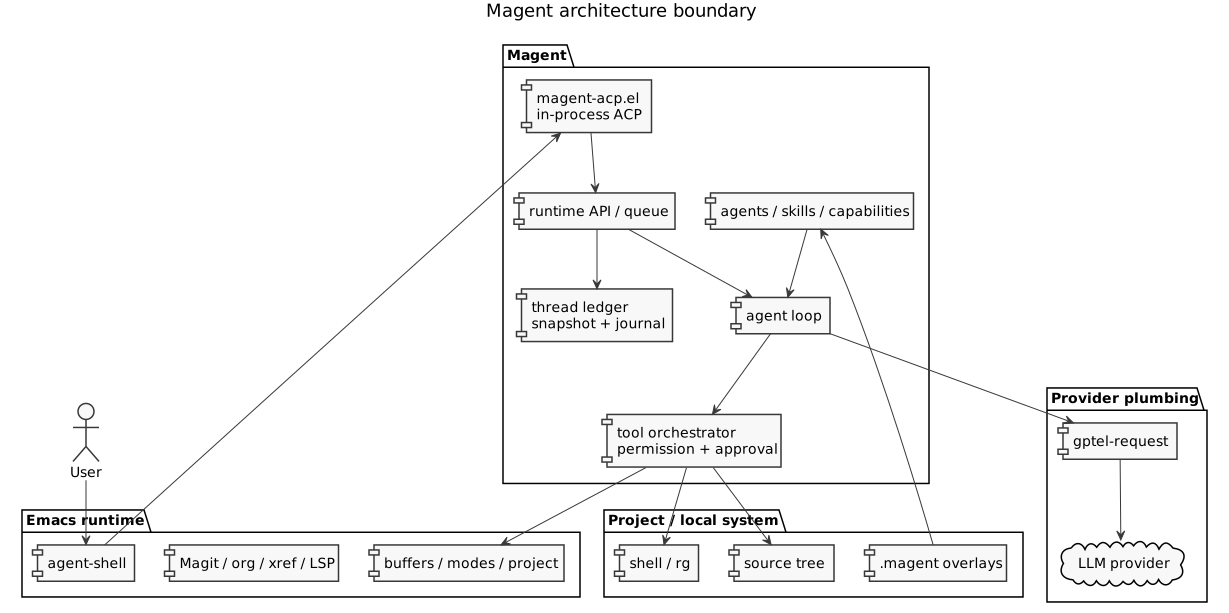
This shape keeps replacement points visible. A provider change should stay behind magent-sampling-gptel.el and gptel configuration. A frontend change should stay around magent-agent-shell.el, magent-acp.el, and magent-runtime-api.el. An Action registration, Workflow, Step, or Invocation change should go through magent-action.el, while isolated Action persistence belongs in magent-action-session.el and its interactive viewer belongs in magent-action-session-view.el. A persistence or resume change should otherwise go through the ledger and session modules. A tool policy change should go through the permission and orchestrator modules.
TRAMP Locality Contract
A remote project changes resource location, not Magent’s control-plane host.
The agent-shell UI, in-process ACP placeholder, gptel transport, runtime queue,
ledger/session persistence, Action control flow, Doctor, skill installation,
child-agent coordination, emacs_read, emacs_eval, emacs_eval_live, and
web_search remain local. Remote session keys are normalized without probing
the TRAMP filesystem, and agent-shell context rendering does not perform image
or containment queries for remote files.
The canonical tool catalog declares one locality for every tool:
| Locality | Tools | Contract |
|---|---|---|
local |
emacs_read, emacs_eval, emacs_eval_live, read_tool_output, child-agent tools, update_plan, web_search |
Runs on the Emacs host. emacs_eval passes the TRAMP project root to the local child as data. |
tramp-file |
read_file, write_file, edit_file, glob |
Local Elisp uses Emacs file APIs; a remote resource is accessed through TRAMP, without starting a project-host process. |
project-process |
bash, grep |
The only tools allowed to start on the project host. Remote execution uses the TRAMP process handler explicitly; search selects rg or same-host git grep. |
Execution locality never comes from ambient default-directory alone. A
project-process executable is resolved on the project host and failure is
reported there; there is no fallback to the local host or home directory.
The grep tool may select git grep --no-index --exclude-standard only when
rg is absent on that same host. It does not silently substitute basic
grep, whose recursive and ignore semantics are not portable. The Git
backend uses POSIX extended regular expressions and reports its identity in
tool-result metadata.
Trusted Action argv Steps and Doctor process probes are local-only and reject a
remote working directory. This is a locality and failure contract, not an OS
sandbox.
Dependency Layers
Emacs Runtime
Emacs is not just a host process. Magent depends on live editor state through buffers, major modes, project roots, timers, processes, URL retrieval, JSON parsing, special-mode, and user-installed packages. Trusted, fixed-shape live inspection goes through emacs_read. Arbitrary emacs_eval runs in a disposable child Emacs by default; only the separately named emacs_eval_live tool evaluates arbitrary code in the user’s running Emacs.
Provider Plumbing
magent-sampling.el defines provider-neutral request and event shapes. magent-sampling-gptel.el performs one sampling request by calling gptel-request and translating gptel callbacks into normalized Magent events. Magent may hide gptel callback/FSM details inside this adapter, but the rest of the loop consumes only normalized events. Reasoning events are kept separate from assistant text; ordinary turns with no final assistant text fail explicitly; direct samplers retain their own allowed-empty contracts. Reasoning is never substituted for an answer.
Thinking policy stays provider-neutral until that adapter boundary. Core runtime
values are auto, enabled, and disabled; explicit modes are translated only
for backends with a guaranteed wire mapping. DeepSeek uses its native
thinking.type request object. Explicit disable suppresses reasoning effort,
and an unknown mapping fails before provider dispatch instead of silently using
the provider default.
Each provider continuation starts a new sample boundary. The public terminal result contains the final assistant message (or the final sample text on providers without message phases), while the ledger keeps the complete turn transcript and tool history. This separation is deterministic and does not trigger a hidden finalization or recovery request.
Prompt Assembly And Trust
magent-agent.el assembles each agent-loop system message from ordered,
file-backed layers. magent-system-prompt is always first, followed by the
optional agent-specific role prompt. Project-root context is followed by applicable
AGENTS.md files discovered from the project root toward request-local file
resources, trusted request-local blocks returned by
magent-context-provider-functions, and capability/explicit instruction skills.
A short runtime trust policy is appended last, so built-in utility
agents and custom agents retain their own output contracts while sharing the
same instruction-provenance and permission invariants. Project instruction
discovery stays inside the canonical project root and is bounded by
magent-project-instructions-max-bytes.
Context providers are trusted local Elisp extensions. Each receives the user prompt, request context, and project root, and may return one self-contained system-context block. Providers run in configured order; failures or invalid return values are logged and ignored. User messages, files, buffers, logs, command output, tool results, web pages, and conversation history remain data at their assigned role. Prompt-like tags inside that data cannot grant permission or promote themselves to runtime instructions. These prompt rules steer model behavior; actual tool availability, approval, and permission enforcement remain in the tool runtime and orchestrator.
The base prompt contains only cross-task coding behavior. Tool schemas come
from gptel, and Emacs-specific procedures are progressively disclosed through
instruction skills. web_search returns titles, URLs, snippets and references.
web_open fetches source text into immutable session-local snapshots; web_find
searches those snapshots. All three share the web_search permission.
The default source is keyless Bing RSS; Tavily is optional and independent of
the gptel model. See README for source registration, dependencies and limits.
Bundled Org prompt resources are enumerated in prompts/manifest.txt. Tests
require the manifest to cover every bundled .org prompt exactly once, so a
new prompt layer must update the manifest as well as the package data recipe.
UI And Runtime API
The supported conversational frontend is agent-shell. magent-agent-shell.el registers the Magent agent-shell configuration and magent-acp.el implements the in-process ACP adapter. ACP text and resource blocks are normalized separately: the full structured input is persisted in turn metadata and reconstructed as user-role model context, while local file:// resources contribute scoped file paths for project-instruction and capability resolution. For each session/prompt, ACP dispatches a registered slash command to its Action through magent-action.el and sends an ordinary prompt directly to magent-runtime-api.el. Action-owned agent turns and Workflow Steps also submit through that runtime API; an Action may complete without entering the general agent loop. magent-runtime-queue.el currently runs one active turn globally, while preserving session-scoped and exact-submission cancellation. Explicit M-x command wrappers share the Action Invocation lifecycle rather than forming a parallel conversation frontend.
Ledger And Persistence
The durable source of truth is a thread -> turn -> item ledger. magent-ledger.el defines the state objects, transitions, and journal events. magent-runtime-api.el creates user submissions, while magent-runtime-queue.el schedules active execution. magent-session.el atomically stores a materialized snapshot plus a bounded tail of the in-memory append-only journal. The snapshot records last-event-seq, so retained events at or below that watermark remain inspectable but are not replayed twice.
Named context views make consumer intent explicit: ledger, transcript,
provider, compaction, and audit. They are not interchangeable canonical
state containers.
Tools, Permissions, And Audit
magent-tools.el owns one canonical catalog of 19 gptel-tool structs:
read_file,write_file,edit_filegrep,glob,bashemacs_read,emacs_eval,emacs_eval_live,read_tool_outputspawn_agent,send_agent_message,wait_agent,list_agents,close_agentupdate_plan,web_search,web_open,web_find
read_file requires an explicit source=disk or source=live-buffer. The
live-buffer source reads an existing file-visiting buffer, including unsaved
changes, without opening a file or falling back to disk. Reads and grep results
return SHA-256 revisions. write_file and edit_file require the expected
revision (or absent for creation), then reject stale disk state as well as
dirty visiting buffers. Clean visiting buffers are changed and saved through
Emacs, while unvisited files use atomic disk replacement.
emacs_read accepts only fixed, bounded live-state operations; it accepts no
Elisp form or function name. emacs_eval starts a fresh emacs -Q --batch
process for every call, so an evaluated kill-emacs or non-yielding form cannot
kill or wedge the parent Emacs. This is process containment, not an OS sandbox:
the child keeps the user’s filesystem, process, and network authority.
emacs_eval_live preserves arbitrary access to live buffers and package state,
but can still hang or crash the main Emacs. Both arbitrary eval tools use an
unbypassable once-only approval policy; session-wide allow decisions are not
accepted. Built-in build and general can expose live eval, while restricted
built-ins do not. /authority reports the current agent’s exact exposure,
decision sources, resource rules, approval policy, and execution boundary.
The catalog is the single source of truth for tool names, implementations, and
permission keys. Ordinary requests select :all; Action agent Steps pass an
exact :tools allowlist, which is then filtered by agent permissions. All tool
implementations return structured magent-tool-result values. Only the provider
boundary renders result text; unstructured runtime or persisted values are
rejected. Oversized model-visible results are truncated centrally;
the full value is stored in a private, TTL/quota-bounded session spill and may
be paged only with its opaque id through read_tool_output. Spill identity
includes the exact runtime scope and session id; pages use one-based character
offsets so even a single oversized line is fully retrievable. glob traverses
in bounded event-loop slices.
magent-tool-orchestrator.el resolves permissions, asks for approval when needed, dispatches the tool call, writes audit records, and reports results back to the loop. magent-permission.el resolves an exact tool rule before the tool wildcard and then default allow. Nested resource rules use exact declared first-match order, including their * entry.
Breaking tool migration
This catalog intentionally has no compatibility aliases:
- Replace
read_buffer(path, ...)withread_file(path, source="live-buffer", ...). - Every
read_filecall must now setsourceexplicitly. write_fileandedit_filerequireexpected_revisionfrom a precedingread_fileorgrepresult; useabsentonly when creating a new path.- Code that previously used
emacs_evalfor live state should use a fixedemacs_readoperation. Arbitrary live behavior must nameemacs_eval_liveand receive fresh approval;emacs_evalnow means disposable child-process evaluation. - Custom Action
:toolsallowlists and skill tool declarations must use the new names. Unknown old names fail during exact tool resolution.
Request Lifecycle
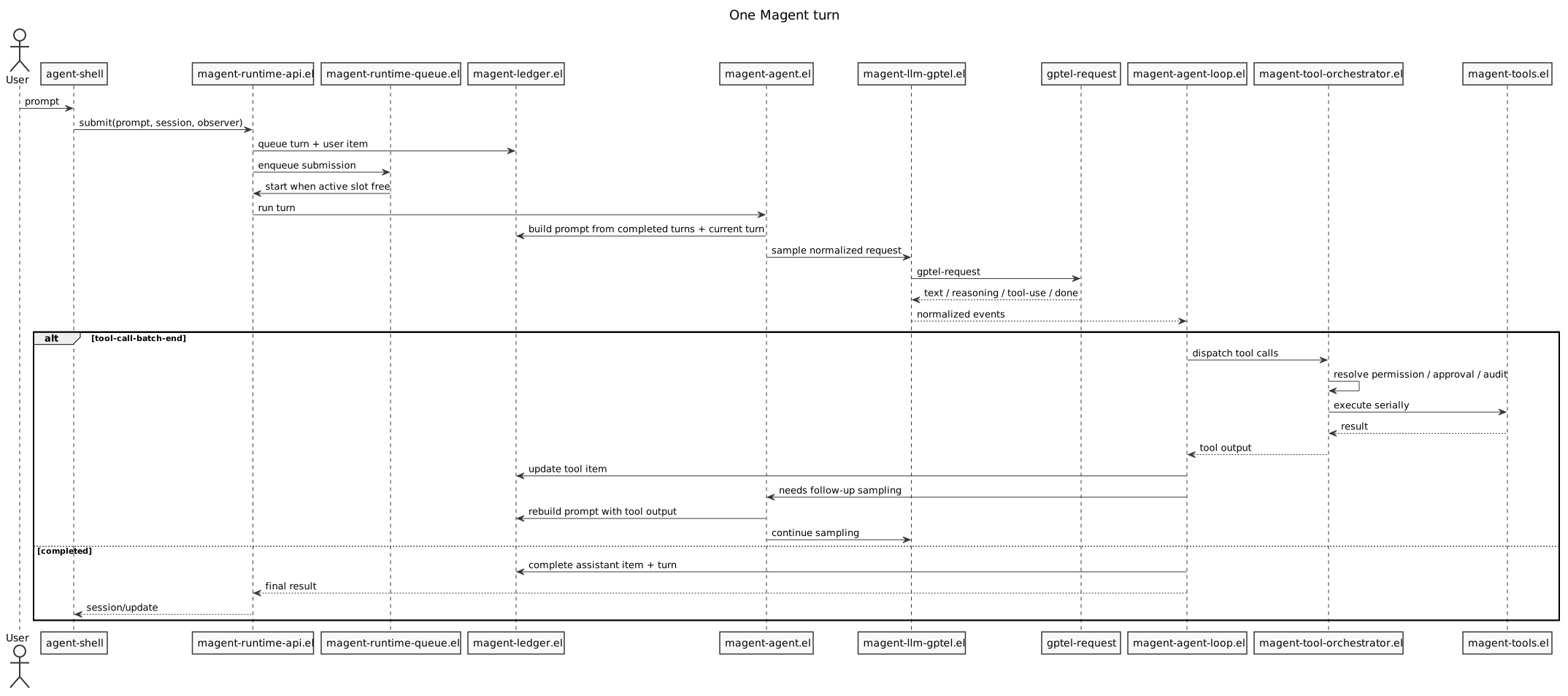
- A user prompt enters through agent-shell as an ACP
session/promptrequest. - ACP resolves a registered slash command projection against the runtime session’s exact scope. Unknown slash input remains an ordinary prompt.
- The registered Action enters
magent-action.elfor argument handling, feature preflight, and session-policy setup, then starts its generator-backed Workflow. Process and callback Steps run outside the agent queue. Agent and terminal Answer Steps entermagent-runtime-api.el; a plain prompt enters the same API directly. magent-runtime-api.elresolves the request-local agent and exact tool set, freezes all execution inputs in onemagent-request-context, then records a queued turn and a completed user item. The submission itself retains only queue lifecycle state, the exact runtime session, and that context.magent-runtime-queue.elstarts the turn when that session’s execution slot is free; other sessions can run concurrently, including in the same project.magent-agent.elconsumes the canonical request context, resolves active capability instructions, and starts the allowed tools without reconstructing a parallel request specification.magent-sampling-gptel.elcallsgptel-requestfor one sampling request.magent-agent-loop.elreceives normalized text, reasoning, tool-call, and completion events.- Tool calls are accumulated until
tool-call-batch-end, then dispatched serially through the orchestrator. - Tool results update the same ledger item that started with the tool call.
- If tool output should be shown to the model,
magent-agent.elrebuilds the prompt from the ledger and starts the next sampling request. - If a provider completes with empty assistant text,
magent-agent.elfails the turn withempty-completionmetadata and does not issue another request. - Completion, failure, abort, or queue drop transitions the turn to its terminal state and notifies the ACP observer.
- A plain prompt resolves the pending ACP request from the turn result. For Action-owned work, the runtime callback first returns to the Action Invocation, whose terminal lifecycle then resolves the ACP request or reports the result to its interactive caller.
This continuation model is Codex-style in the sense that tool results feed a follow-up sampling request, but it remains Emacs-native and gptel-backed.
Functional Layers
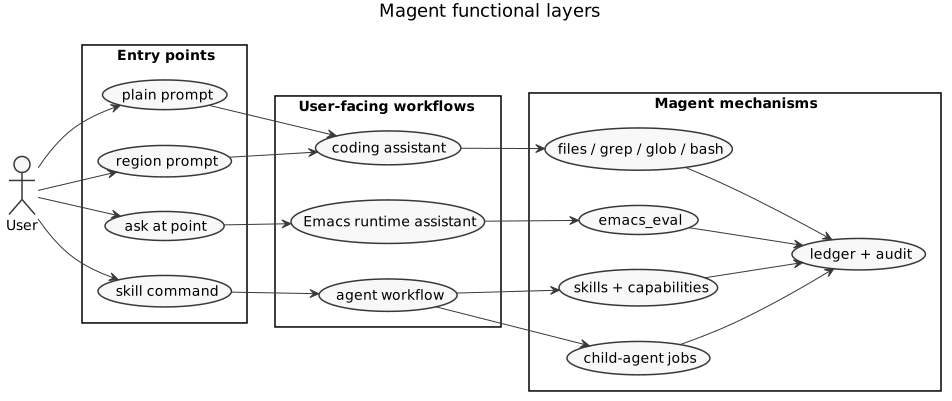
Magent can be understood through four user-facing workflows. The first is a coding assistant workflow: read code, search code, edit files, run tests, explain failures, and produce commit or PR-style summaries. The second is an Emacs runtime assistant workflow: use emacs_read for ordinary live inspection and reserve emacs_eval_live for explicitly approved arbitrary live operations. The third is an agent workflow: use skills, capabilities, and child-agent jobs. The fourth is an explicit Action workflow: invoke one registered Action from agent-shell slash input or an exposed M-x command wrapper. An Action may reuse the current conversation or create an isolated durable session; Doctor is the bundled isolated example.
The product is therefore more than a prompt box with tools. It turns Emacs workflows into actions that can be invoked, audited, resumed, and projected back into the UI.
Extension Model
Magent has three file-backed extension layers:
- Custom agents under
.magent/agent/*.md. - Skills under bundled
skills/, user~/.emacs.d/magent/skills, and project.magent/skills/. - Capability metadata embedded in skills with
capability: true, plus standaloneCAPABILITY.mdfiles under user capability directories and project.magent/capabilities/when trigger metadata should live outside one skill.
Actions are a separate Elisp-native extension layer. magent-action.el is one
deep module that owns the generator Workflow DSL, managed Step runtime, layered
registry, and Invocation lifecycle. An Action declares slash/interactive
exposure, current/isolated session policy, argument handling, feature/tool
preflight, progress, cancellation, and completion. Ordinary Elisp provides
control flow; managed agent, terminal Answer, argv process, and callback Steps
provide asynchronous suspension and activity recording. Agent Steps separate
prompt text, model-visible popwin-style buffer snapshots, exact tool
requirements, and request-local agent/skill selection while inheriting
frontend request context from the Invocation. They may also freeze request-local
reasoning effort and thinking mode. Content blocks and canonical
Action metadata are persisted internally. Trusted packages may own a longer
asynchronous Invocation without receiving ACP or queue internals. The bundled
/explain, /fix, /init, /review, and /test prompt Actions
are data entries in magent-action-builtins.el; their terminal Workflows are
generated uniformly from Org prompt resources.
An Invocation claims its terminal result before cleanup, so a Step failure cancels only its owned submission without allowing synchronous cancellation callbacks to overwrite the failure or continue work after ACP completes. Finalization errors are terminal failures, not successful results with hidden cleanup damage.
magent-skills.el also owns frontend-neutral, scope-aware skill descriptors.
ACP projects every instruction descriptor as $name, which agent-shell renders
as /$name, and dispatches it as an ordinary runtime turn with an explicit
skill selection. Skills never enter the Action registry and do not participate
in the Action Invocation lifecycle. Project agent, skill, capability, and
Action definitions remain registered with their canonical project scope; no
parallel skill catalog snapshot is maintained. ACP and request execution
resolve against each runtime session’s exact scope, allowing multiple project
sessions to coexist safely. A future frontend may consume the same descriptor
API while presenting command projections and skills as separate surfaces.
magent-action-session.el supplies persistence, ledger recording, inspection,
and cancellation for Actions using :session-policy 'isolated.
magent-action-session-view.el separately owns interactive listing and
inspection. Neither module owns a second registry or context type. /doctor
also exposes a magent-action-run-* wrapper, and both surfaces execute the same
Invocation lifecycle. Its registration is controlled by
magent-action-enabled-builtins; Custom changes atomically refresh the
registry and frontend discovery. New sessions are stored under
magent-session-directory/actions. The former commands/ format is neither
migrated nor read; old files remain untouched.
magent-action-run-doctor is the security-sensitive direct-pipeline case. Trusted,
read-only probes in magent-action-builtin-doctor.el collect bounded JSON-safe data, which is
normalized and redacted through magent-redaction.el before persistence or one
tool-free provider request. Doctor never enters the general agent loop and
never exposes emacs_eval, shell, or file tools. Custom probes are trusted
Elisp rather than sandboxed code; see DOCTOR.org.
Skills are instruction-only Markdown injected into the system prompt.
Executable extensions belong in trusted Elisp Actions or the first-class tool
catalog; companion code next to SKILL.md is not loaded. Capabilities score the
current context and activate a small number of instruction skills. Automatic
activation requires an explicit prompt-keyword intent match in addition to
contextual score; mode, feature, or file matches alone remain suggestions.
Keyword matching uses word boundaries, and a capability cannot inject a linked
skill whose declared tools are unavailable to the selected agent. The
agent-shell session config exposes an Automatic capabilities switch for
disabling this automatic layer without affecting explicitly selected skills.
magent-skill-manager.el is a separate, lazily loaded user-maintenance layer.
It searches skills.sh, resolves local or public GitHub sources, preflights and
copies instruction skills into the canonical user directory, records
provenance, and permanently deletes exact user-level installations. It is not
a model tool, never manages project-local definitions, and never reads or writes
~/.agents/skills/.
The distinction is:
- An
Actionis the executable trusted-Elisp domain abstraction. It may be projected as a slash command, an interactive command, or both. A prompt Action normally owns one agent turn; an advanced Action may own multiple asynchronous Steps. - A
commandis a frontend or protocol projection of an Action, not a second extension abstraction. - A
skillis reusable, data-only model instruction selected for an ordinary turn. It is not converted into an Action. - A
capabilityis an automatic activation rule: resolver metadata such asmodes,features,files,prompt-keywords,disclosure, andriskthat says when one or more skills should be selected for this turn. Context-only matches are inspectable suggestions; active disclosure also requires a bounded keyword match in the current user prompt. - A skill-backed capability is the common contextual case: a
SKILL.mddeclarescapability: true, and the resolver auto-activates that same skill when the current context and prompt intent match and its declared tools are available.
Product Tradeoffs
Magent is closest to gptel plus a stateful agent runtime, not a replacement for gptel. Compared with wrapping a terminal agent inside Emacs, Magent can inspect and use live editor context. Compared with Codex or Claude Code, Magent does not aim for broad multi-surface coverage or strong OS isolation; its advantage is low-friction access to a long-lived Emacs environment.
The practical consequence is that new work should preserve these boundaries:
- Keep provider work in gptel and
magent-sampling-gptel.el. - Keep frontend work in
magent-agent-shell.el, ACP conversion inmagent-acp.el, and shared runtime behavior inmagent-runtime-api.el. - Keep durable workflow state in the ledger.
- Keep child-agent behavior aligned with
docs/AGENT_JOBS.org. - Treat permissions as confirmation/audit workflow, not as sandbox security.